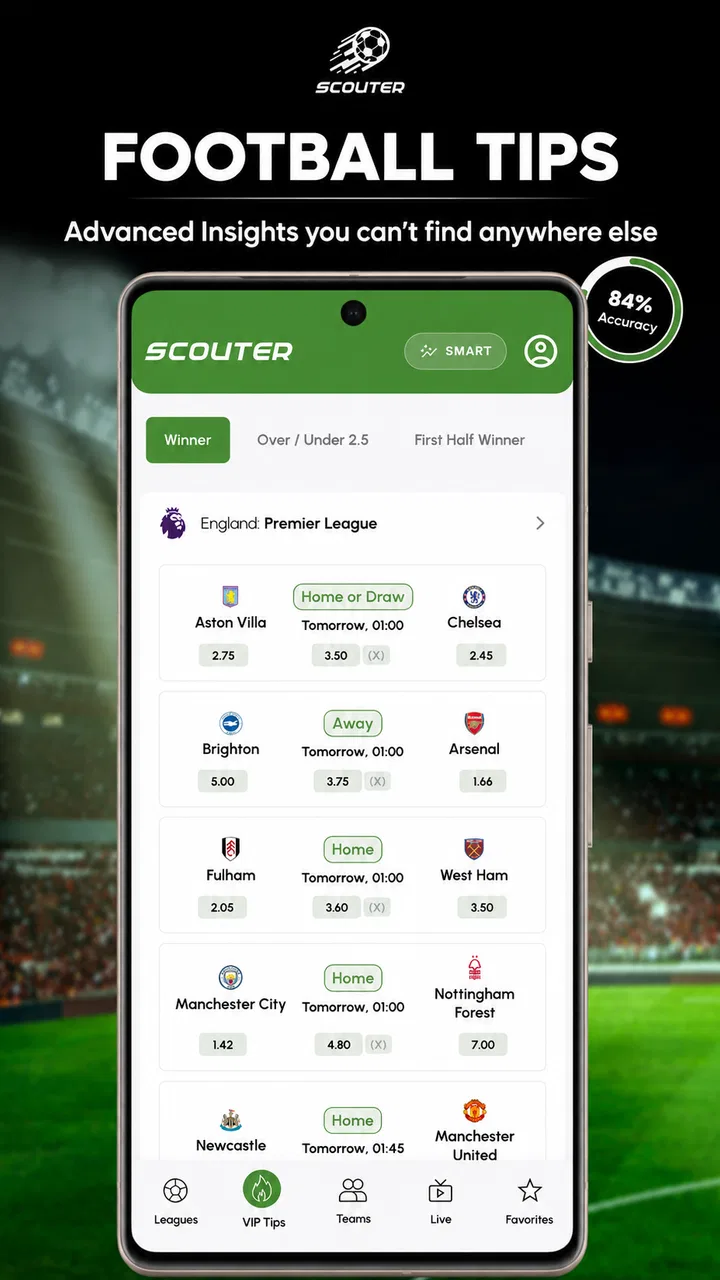
Soccer Tips - Scouter
- 4.8
- Rating
- 500.00K
- Installs
- Free
- Price

 Analysis by App-foxy
I approached Soccer Tips - Scouter as a practical football companion rather than as a replacement for watching matches or making a personal judgment. Its focus is straightforward: AI tips, live scores and statistics in one sports app. That combination makes sense for someone who wants a quick way to follow fixtures, check how teams are performing and use data as part of a match-prediction routine.
My first impression is that the app is aimed at users who prefer a compact overview instead of jumping between a score service, a statistics page and a separate prediction tool. It is free to install, rated for Everyone, and has built a sizeable audience with more than half a million installs. The average rating of 4.8 also suggests that many users find its central idea useful, although a high rating should not be mistaken for a guarantee that every tip will be correct.
Getting oriented before trusting the tips
The developer behind the app is Artlines Web Solutions, and the product sits firmly in the sports category. The store summary presents it as a combination of AI tips, live scores and statistics, while its shorter description reduces the idea to “Soccer Tips.” That wording is useful because it sets the right expectation: this is not a full football news publication, a fantasy manager or a live-streaming service. It is built around information that can help you assess matches.
You May Also Like

 Blood Strike: 2.5 Anniversary
Blood Strike’s Loadouts Turn Every Drop Into a Tactical Gamble
A close look at Blood Strike’s custom loadouts: how fast access to signature weapons reshapes its battle royale rhythm, rewards preparation, and narrows the gap between fights.

 Pandora - Music & Podcasts
Pandora’s Music Is Easy to Start, but Harder to Recover
Pandora’s strength is its low-effort path from a seed to a station. Its weak spot is how much confidence it asks you to place in connection, setup, and quiet recovery.

 8 Ball Pool
 Is Built on Rivalries, Rematches, and Routine
A close look at the rivalries, rematches, shared routines, and unanswered safety questions that turn a quick pool match into a persistent mobile community.

 Samsung Music
’s Quiet Strength Is Playing What You Already Own
Its reach comes less from spectacle than from dependable access to a personal library. That simplicity is both the app’s strongest retention engine and its ceiling.

 AccuWeather: Weather Radar
AccuWeather Review: A Quick, Clear Forecast for Everyday Decisions
For everyday plans, the best forecast is the one you can understand quickly. AccuWeather makes rain timing, radar, and local conditions easy to act on, with a few trade-offs.

 Hill Climb Racing
Why Hill Climb Racing Still Turns Crashes Into One More Run
A tiny car, a bumpy hill and one more upgrade: Hill Climb Racing keeps resurfacing because its simple chaos makes every near-miss feel personal.
More From Our News Desk



For a first-time user, the most important mental adjustment is to treat the predictions as a starting point for research. A tip can draw attention to a fixture, but it should not replace checking the competition, team news, recent schedule or the context of the match. I find this approach much safer than opening the app with the expectation that an AI recommendation is an automatic answer.
The app is free, which removes the main barrier to trying it. It does include optional in-app purchases ranging from $1.49 to $99.99 per item, so I would pay attention to any upgrade or purchase screen before confirming anything. The basic download is therefore easy to test, but users who dislike optional paid extras should decide in advance whether they are comfortable using only the free experience.
Compatibility is also fairly approachable. The current version is 1.4.23 and it supports Android 7.0 or later. That makes it suitable for many older Android phones, although the experience can still vary depending on screen size, connection quality and how much other work the device is doing in the background. Since this is an information-heavy sports tool, a stable connection matters more than raw gaming performance.
What I would do immediately after installing
I would begin with one simple goal: find a match I already know and use it as a reference point. Choosing a familiar fixture makes the first session less confusing because I already understand the teams and can judge whether the displayed information is relevant. Instead of browsing every available option, I would look for the live-score area or the match list, open one fixture and then inspect the statistics connected with it.
This small workflow is more useful than trying to understand every screen at once. First identify the match, then look at the score information, and only after that examine the tip. The order matters because it keeps the prediction in context. If I started with the tip alone, I might give it more authority than it deserves.
I would also spend a few minutes learning how the app separates upcoming matches from live events and completed results. Sports apps often place these areas close together, and a new user can easily mistake a historical result for a current update. Checking the match status before interpreting any number is one of the simplest habits that prevents a bad conclusion.
Turning the first visit into a useful result
The first meaningful success should not be “the app predicted a winner.” For me, it would be reaching a clear decision about whether a match deserves closer attention. I would select an upcoming game, read the available tip, compare it with the statistics shown for that fixture and write down my own expectation before the match begins. That creates a small, honest test of the app without pretending that one outcome proves anything.
A practical example would be checking the app before a weekend match involving a team I follow. I might use the live-score section to confirm the fixture, inspect the available statistics and note whether the AI tip agrees with my initial view. If it does, I would still ask why the recommendation appears reasonable. If it disagrees, that disagreement becomes the useful part: I can look for a form pattern or statistical angle I had overlooked.
This is where the app can save time compared with the usual alternative of opening several browser tabs. A general search engine may show news, fixtures and scattered statistics, but it rarely gives the same focused match-by-match workflow. A dedicated score app may be better for rapid notifications or broader competition coverage, while a specialist statistics website may offer deeper historical analysis. Soccer Tips - Scouter is more appealing when I want a quick blend of prediction and match information in one place.
My strongest tip for using it responsibly is to keep a simple record of your own decisions. Note the fixture, the app’s recommendation, your interpretation and the eventual result. Do not use the record to chase losses or increase spending. Use it to discover whether the information actually improves your understanding over time. This is a more reliable test than judging the app after one surprising result.
How to read the information without overreading it
AI wording can sound more confident than the underlying evidence. I would therefore separate three things: what has already happened, what the statistics suggest and what the tip recommends. A live score is an observation. A statistic is a summary of past or current information. A prediction is an estimate. Keeping those categories separate makes the app much easier to use sensibly.
Another useful habit is to compare the tip with the match situation rather than with a personal preference. Supporting a club can make a recommendation feel right or wrong before the evidence is considered. I try to read the information once without deciding, then form an opinion afterward. This is especially helpful when the app presents a recommendation that conflicts with the team I normally support.
I would also avoid treating a single statistic as decisive. A strong recent record may come from easier opponents, while a poor-looking sequence may include difficult fixtures. The app can help bring relevant information together, but the user still needs to ask what the numbers mean. That is the trade-off of convenience: faster access, but a greater temptation to accept a summary without examining its context.
Where new users may hesitate
The biggest possible confusion is understanding what the app’s “tips” represent. The term can mean different things to different football fans, so I would read the wording attached to each recommendation carefully rather than assuming every tip means the same type of outcome. A user looking only for final-score predictions may approach the screen differently from someone interested in broader match markets or statistical patterns.
Live information can also create false urgency. When a score changes, it is natural to refresh repeatedly and interpret every update as a new signal. I think the better approach is to use live scores for awareness and the statistics for context, not to make rushed decisions every time the match moves in an unexpected direction. The app is most useful when it reduces noise, not when it encourages constant reaction.
Another point worth understanding is the difference between popularity and suitability. With around twenty-two thousand ratings, the app has enough public feedback to show that it works well for many people. However, users have different expectations. Someone who wants a lightweight football tip tool may be satisfied, while someone seeking detailed tactical analysis, extensive historical databases or a full news feed may prefer a more specialized service.
The number of written reviews is much smaller than the number of ratings, so I would not rely on a handful of comments to predict my own experience. Ratings provide a broad signal, but the best test remains a short personal trial using familiar matches. If the layout helps you reach an informed view quickly, it is doing its job. If you still need several other apps to understand each fixture, its convenience may be less valuable to you.
Three workflows that make the app more useful
My first recommended workflow is the “known match” test. Choose a fixture you already understand, check the tip and statistics, and compare the app’s presentation with your own knowledge. This exposes whether the information is clear enough for you to use. It also avoids the common mistake of evaluating an unfamiliar league where you cannot tell whether the context is sensible.
The second is the “before and after” check. Look at an upcoming match before it starts, record the recommendation, and revisit the same fixture after the result. The purpose is not to celebrate a correct call or punish a wrong one. It is to see whether the app gave you a coherent reason to follow the match and whether the information remained understandable when the outcome was different from the prediction.
The third is a “two-source boundary.” Use Soccer Tips - Scouter for its focused combination of tips, scores and statistics, but reserve a separate trusted source for information it does not replace, such as detailed team news or broader football reporting. This prevents the app from becoming your only lens. In my view, that is a better arrangement than demanding that one sports app do everything.
These workflows also reveal an important trade-off. The more quickly an app summarizes a match, the less time you may spend exploring the underlying details. That is not automatically a flaw; it is the reason many people prefer a focused tool. But if you enjoy building a long-form analysis from many variables, a deeper statistics platform will probably suit you better.
Who will get the most from it
I would recommend trying this app if you regularly check football fixtures and want predictions placed close to live scores and statistics. It is particularly suitable for a casual supporter who wants a repeatable pre-match routine without assembling information manually. It can also help a more experienced fan spot a fixture worth investigating, provided the recommendations are treated as prompts rather than certainty.
It is less suitable for someone who wants guaranteed outcomes, instant expert commentary or a substitute for personal judgment. It is also not the right choice for a user who only wants final scores and has no interest in tips or statistical context. In that case, a simpler score-focused app may feel faster and less distracting.
People who are uncomfortable with optional purchases should also approach the app deliberately. The free entry point is helpful, but the presence of paid items means I would avoid tapping through upgrade prompts automatically. Decide what you need first. If the free functions already support your match routine, there is no reason to purchase anything merely because it is presented during browsing.
What I would check during regular use
After the first session, I would use the app at a consistent point in my routine, such as before choosing which matches to watch. Consistency makes it easier to judge whether it is genuinely saving time. If I open it only after a match has become exciting, I am measuring entertainment rather than usefulness.
I would also keep expectations realistic around updates. Live scores are valuable precisely because they change, so a delayed refresh or a momentary connection problem can affect the experience. When a decision depends on a current score, I would verify that the match status has updated before drawing a conclusion. That extra second is more valuable than reacting to stale information.
Version 1.4.23 indicates that the app is actively maintained as a current product, but I would still update it through the normal app-store process when an update is available. Keeping the installed version current is especially sensible for a live sports tool, where display behavior and data handling can matter as much as the visible design.
For families, the Everyone age rating makes the app broadly accessible from a content perspective. Even so, I would explain to younger users that tips are predictions, not promises, and that any purchase screen requires adult attention. The age label describes suitability, but it does not teach responsible use of sports information or spending.
My recommendation after using it as a decision aid
Soccer Tips - Scouter works best when I use it to organize a football check-in: find the match, see the current or scheduled status, review the available statistics, and consider the AI tip as one opinion. That path from installation to first useful result is simple enough for a beginner, but it still leaves room for a thoughtful user to build a more disciplined routine.
I like the balance between speed and context. Compared with searching the web manually, the app offers a more direct way to move from a fixture to a recommendation. Compared with a highly specialized statistics service, it is likely to feel less demanding and more approachable. The compromise is that convenience can encourage shallow reading, and no prediction tool should be treated as infallible.
My final advice is to give it a short, structured trial rather than judging it from one tip. Use familiar matches, record what you saw, separate live facts from predictions and keep another source available for deeper context. If that process makes your football routine clearer, the free app is worth keeping. If you want exhaustive analysis or only need bare score updates, a different sports tool will probably be a better fit.
Overall, I see it as a useful companion for fans who want quick football insight without abandoning common sense. Its strongest value is not promising certainty; it is putting several relevant pieces close together so I can make a more informed choice about what to watch, follow or investigate next.
FAQs for Soccer Tips - Scouter
01What is Soccer Tips - Scouter, and what does it offer?
Soccer Tips - Scouter is designed for football fans who want match previews, statistical information, and betting-oriented insights in one place. After exploring the app, its main value comes from helping users compare team form, recent results, head-to-head records, scoring trends, and other available data before a match. It should be treated as an analytical aid rather than a guarantee of any result.
02Can Soccer Tips - Scouter guarantee winning football predictions?
No. Soccer Tips - Scouter cannot guarantee winning predictions, because football matches are affected by injuries, tactics, refereeing decisions, weather, motivation, and unexpected events. The app’s tips and statistics may help users organize their research, but they should not replace personal judgment or responsible decision-making. Anyone using the information for betting should set limits, understand the risks, and never stake money they cannot afford to lose.
03Which competitions and matches are covered by Soccer Tips - Scouter?
Coverage can vary depending on the app’s current data sources, updates, and regional availability. Users may find information for popular domestic leagues, international competitions, and selected matches from less prominent tournaments. Before relying on a particular prediction, check whether the competition is listed, whether the match data is current, and whether lineups, postponements, or schedule changes have been reflected in the latest update.
04Does Soccer Tips - Scouter require an internet connection or account?
The app generally needs an internet connection to retrieve updated fixtures, statistics, predictions, and match information. Some previously loaded content may remain visible temporarily, but offline access should not be assumed for live or recently updated data. Depending on the version and platform, certain features may also require registration, permissions, or access to advertising-supported services. Review the app’s current requirements before downloading.
05Is Soccer Tips - Scouter free to download and use?
Soccer Tips - Scouter may be available as a free download, although the exact pricing model can depend on the Android or iOS version. Free apps may include advertisements, optional premium features, subscriptions, or in-app purchases. Check the store listing carefully for current costs and renewal terms. If you use the app for betting research, remember that downloading it does not make gambling risk-free or guarantee profitable results.
Pros
- Simple interface makes tips easy to browse quickly.
- Covers multiple leagues and competitions in one place.
- Useful for comparing several predictions before a match.
- Lightweight app with quick loading on most devices.
- Helpful for users who enjoy pre-match statistics and analysis.
Cons
- Predictions are not guarantees and may lead to financial losses.
- Some leagues may have limited coverage or fewer daily tips.
- Tip quality can vary between matches and competitions.
- Advertising may interrupt browsing or reduce reading comfort.
- Limited value for users seeking live scores or in-play updates.

Soccer Tips - Scouter
Gallery